Performance Obligation
Last updated: March 18, 2026
Performance Obligations is currently in Early Access. Contact your customer success manager to learn more.
Performance Obligations help you manage how revenue is recognized in Tabs. They allow you to separate how customers are billed from how revenue is recognized, enabling more flexible and compliant revenue recognition workflows.
What is a Performance Obligation?
A Performance Obligation (POB) represents a promise to deliver a product or service to a customer.
Under ASC 606, companies must:
Identify the contract
Identify the performance obligations
Determine the transaction price
Allocate the transaction price to the performance obligations
Recognize revenue when each performance obligation is satisfied
Tabs separates billable Products (how customers are invoiced) from Performance Obligations (how revenue is recognized). This allows revenue recognition to differ from billing when needed—for example with bundled products or pricing ramps.
Common Scenarios
Tabs supports several common billing and revenue scenarios:
One Billable Product → One Performance Obligation
The most common case.
Example:
A subscription product is billed and revenue is recognized for the same product.
One Billable Product → Multiple Performance Obligations
Used for bundles.
Example:
A bundle product is billed, but revenue is recognized across multiple underlying products.
Multiple Billable Products → One Performance Obligation
Used for ramp pricing.
Example:
A product is billed at different prices over time, but revenue is recognized as a single stream.
Multiple Billing Products → Multiple Performance Obligations
Used for ramped bundles.
Example:
A bundled product has ramp pricing and revenue is recognized across multiple underlying products.
Performance Obligation Fields
When creating or editing a Performance Obligation, the following fields are available in Tabs:
Revenue Recognition Patterns
Tabs currently supports the following revenue recognition patterns:
Straight-line
Revenue is recognized evenly over the service period. The first and last months are prorated by day. This is only available for Fixed consideration performance obligations.
Recognize as Consumed
Revenue is recognized as usage is consumed. This option requires a defined usage Event Type and recognition is based on the event date.
Recognize as Billed
Revenue is recognized immediately when the invoice is issued. In this case, the service period dates are automatically derived from the billing schedule.
Where Performance Obligations Appear in Tabs
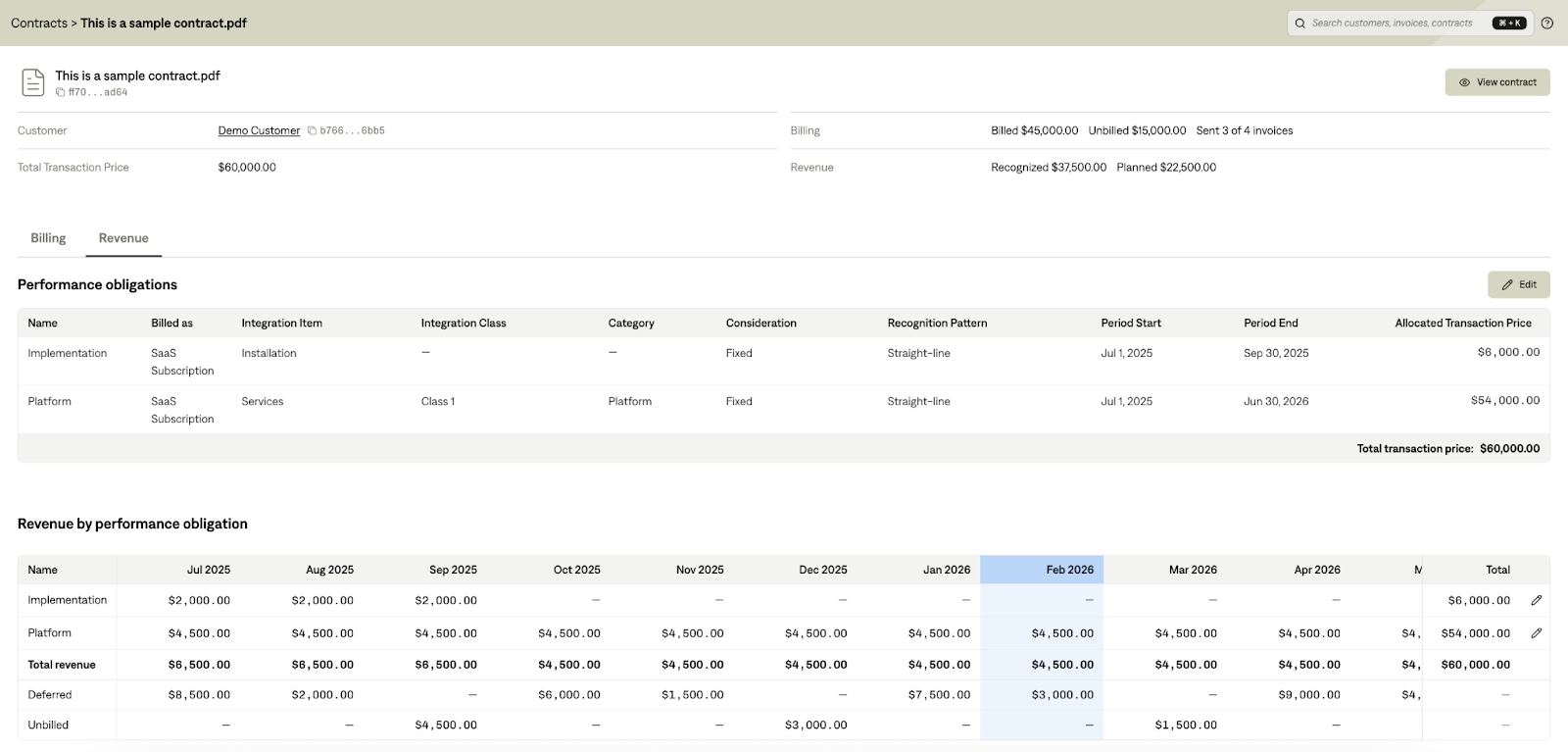
Contract Details – Revenue Tab
In the Revenue tab of a contract, you can:
View all performance obligations
Edit performance obligations fields, including revenue recognition pattern
Split an existing POB into multiple POBs
Reallocate the transaction price between obligations
Customize revenue schedules across the service period
Products Page
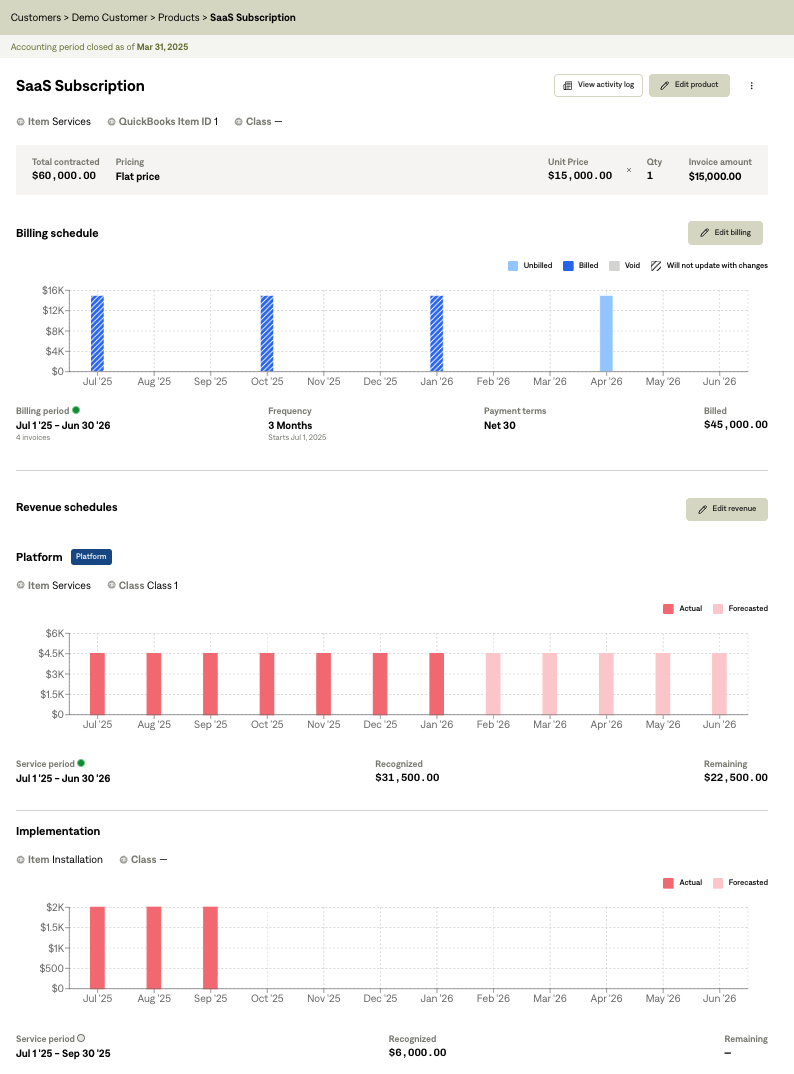
On the Products page:
If a Billing Term maps to multiple POBs, all associated revenue schedules are displayed.
Selecting Edit Revenue redirects you to the contract’s Revenue tab, where POBs can be modified.
Revenue Reporting
Revenue schedules created from Performance Obligations power several reports and financial calculations in Tabs, including:
Revenue Recognition (GAAP) reporting
ARR Waterfall
Deferred and unbilled revenue calculations
Revenue journal entries generated from Close Management
Editing Restrictions
Certain fields cannot be edited under specific conditions:
Closed Accounting Periods
If service dates fall within a closed accounting period, those dates cannot be modified.
Variable Consideration
For usage-based revenue:
Allocated transaction price cannot be directly edited
Revenue is determined by usage events
Fixed Consideration
Once an invoice has been sent to the ERP, the following fields cannot be changed:
Billed As
Consideration type
Recognition pattern
If Period Start is in accounting closed period, then user cannot edit the following fields
Billed as
Integration item
Integration class
Consideration
Recognition Pattern
If Period End is in accounting closed period, then user cannot edit the following fields
Allocated Transaction Price
Credit Memos and Performance Obligations
Credit memos do not modify Performance Obligations directly. Instead, they generate contra revenue that adjusts recognized revenue.
When a credit memo is issued:
Contra revenue lines appear in the contract’s Revenue tab
These adjustments are included in revenue reporting and deferred revenue calculations
The credit amount is allocated across affected POBs based on the original transaction price allocation.
If multiple POBs share the same ERP integration item, the contra revenue will appear as a single consolidated line.
Service Period Handling
By default, contra revenue is recognized in the month the credit memo is issued.
You can alternatively:
Spread the credit across a longer service period, or
Adjust the remaining revenue schedule to offset the credit earlier.